WhatsApp is one of the most commonly used instant messaging applications for daily communication. Many people use it to chat with friends, share photos, save important conversations, and preserve precious memories of various moments. However, some users want more control over their WhatsApp data, such as extending message retention time, managing saved photos, or retaining old chat history when switching phones. For those who prefer to manage media files more carefully, learning how to stop WhatsApp from saving photos android can help prevent unwanted images from being stored automatically while keeping the chat experience more organized.
For users who want to manage their WhatsApp experience differently, FM WhatsApp offers a wider range of customization options. With its additional settings, users can flexibly adjust how messages, media files, and personal information are stored.
This guide will explore how to use FM WhatsApp to permanently save WhatsApp content, covering photo saving settings, message management, and methods for retaining chat history when switching devices.
Why Do People Want to Keep WhatsApp Content Forever
WhatsApp chat logs often contain useful information, personal memories, work details, and important documents. For many users, deleting old messages may not be the best option.
Keeping WhatsApp content for a long time can help users:
- Find old conversations quickly
- Save important text information
- Keep photos and videos from special moments
- Check previous discussions when needed
- Transfer chats to a new phone easily
FM WhatsApp aims to give users more control over these everyday functions. It offers a range of additional options that make managing chat and media files more flexible.
How FM WhatsApp Helps Keep Your WhatsApp Data
FM WhatsApp offers a range of features related to message and media management, which users can customize to their needs.
Some useful options include:
- More control over media downloads
- Better chat organization
- Extra privacy settings
- More customization choices
- Flexible backup options
Unlike WhatsApp, which only offers basic settings, FM WhatsApp allows users to fine-tune how chats are handled.
How to Stop WhatsApp from Saving Photos
Many WhatsApp users receive a large number of pictures every day. These photos may automatically appear in the phone’s photo album, causing storage space to fill up quickly.
If you want better management of your saved photos, you can change the media settings.
Stop WhatsApp Photos from Appearing in Gallery
Follow these steps:
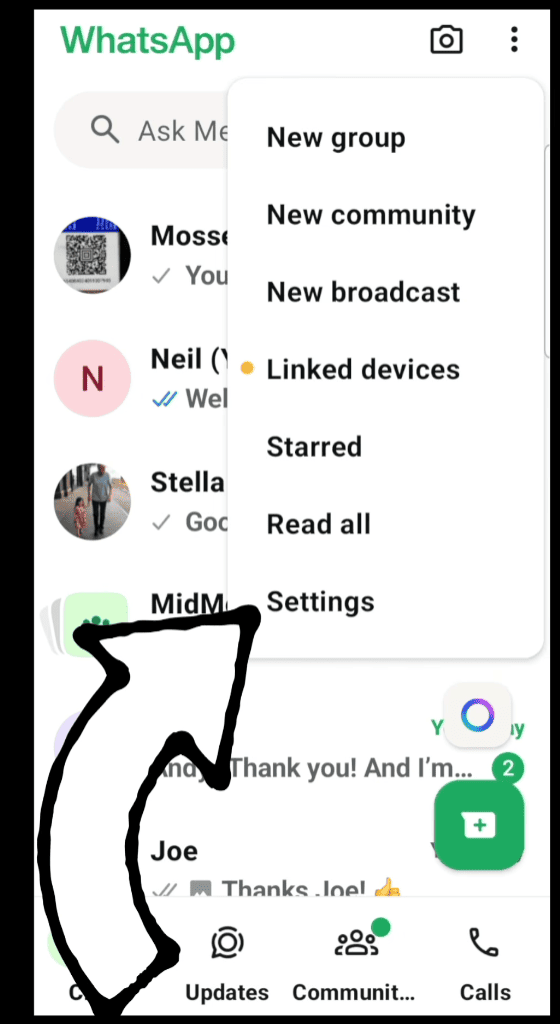
- Open WhatsApp or FM WhatsApp.
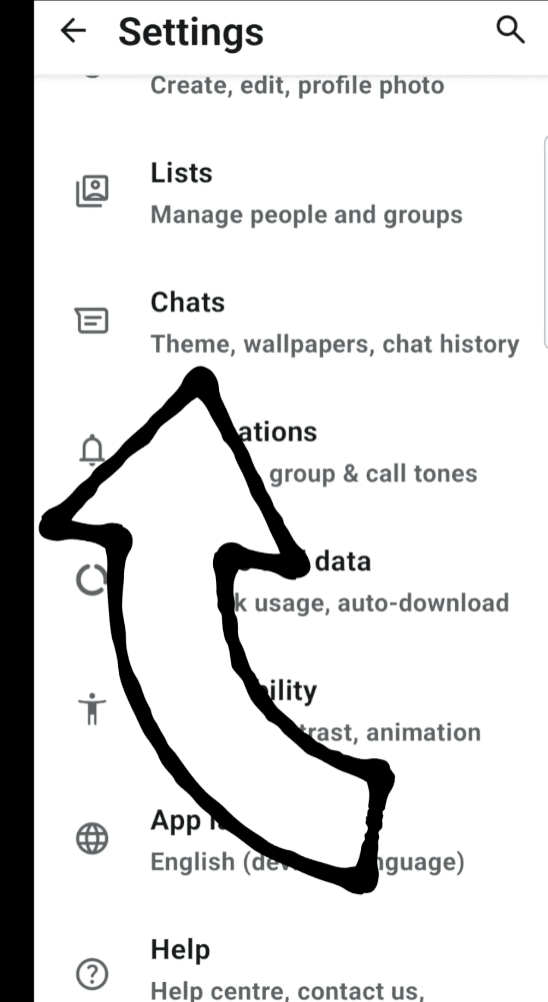
- Go to Settings.
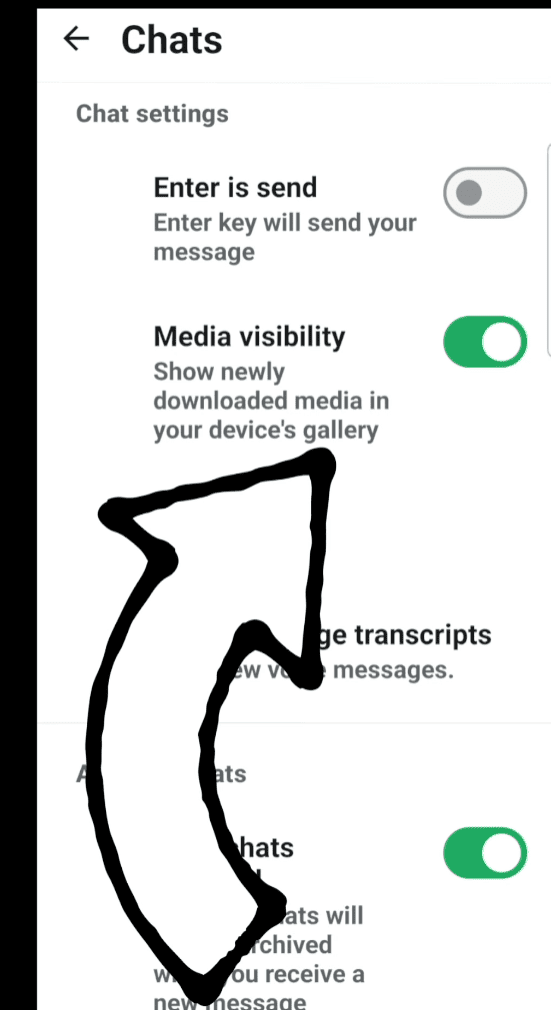
- Select Chats.
- Find the option related to media visibility.
- Turn off automatic photo display in the gallery.
After changing this setting, received images will remain in WhatsApp and will not appear directly in your phone’s photo album.
Manage Photo Downloads in FM WhatsApp
FM WhatsApp also offers more detailed media control options, allowing users to decide when photos will be downloaded automatically.
For example:
- Download images only with Wi-Fi
- Disable automatic downloads
- Select specific media types
- Manage storage usage better
This helps keep the phone cleaner while allowing users to save important photos manually.
How to Delete WhatsApp Messages for Everyone After Long Time
Typically, WhatsApp allows users to delete messages for all participants within a limited time. However, many users wish to be able to manage old messages more easily.
FM WhatsApp offers additional messaging options, giving users greater flexibility in managing conversations.
To delete messages:
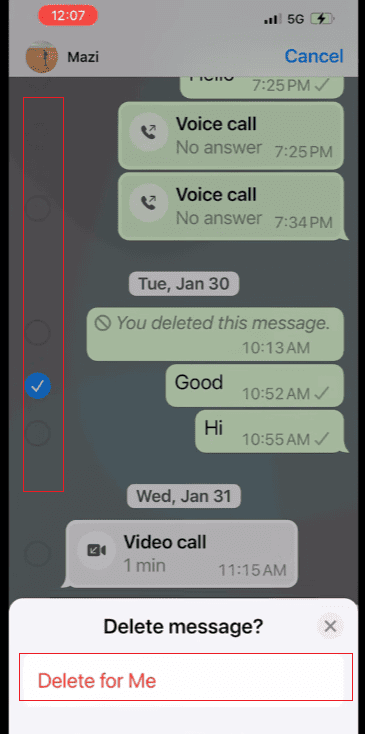
- Open the chat.
- Press and hold the message.
- Select the delete option.
- Choose the option to remove the message for everyone if available.
This feature is useful when users want to clear out old conversations or delete messages they no longer need.
Why Message Management Matters
Keeping too many old messages can make chat history difficult to organize. Regularly managing conversations helps users:
- Keep important chats easier to find
- Remove unnecessary information
- Improve chat organization
- Save phone storage
FM WhatsApp gives users more choices when handling their messages compared with standard WhatsApp settings.
How to Keep WhatsApp Messages When Changing Phone
Changing your phone doesn’t mean you’ll lose your old WhatsApp chat history. By using the correct backup and migration methods, information can be transferred to a new device.
Create a Chat Backup
Before changing phones:
- Open WhatsApp settings.
- Enter the chat backup section.
- Create a new backup.
- Wait until the backup process finishes.
A complete backup helps keep:
- Text messages
- Group chats
- Photos
- Videos
- Shared files
Transfer WhatsApp Messages to a New Phone
When setting up WhatsApp on a new phone:
- Install WhatsApp or FM WhatsApp.
- Verify your phone number.
- Choose the restore option.
- Wait for your chats to load.
After the process is completed, your old conversations can appear on the new device.
Use FM WhatsApp Backup Options
FM WhatsApp users can also manage backups through the relevant settings. This allows users to save important conversations and restore them when needed.
Regular backups are very useful because they can prevent the loss of valuable chat history when switching devices.
Tips to Keep WhatsApp Chats Organized for a Long Time
Permanently preserving information depends on more than just storage space; good organization can also make old information easier to use.
Here are some simple tips:
1. Clean Unnecessary Files Regularly
Large videos and repetitive images can take up a lot of storage space. Deleting unnecessary files helps keep WhatsApp running smoothly.
2. Save Important Chats
For important conversations, you can use the chat backup or export function to save a separate copy.
3. Use Chat Organization Features
Pin important chats to the top and archive less important conversations. This can make daily communication easier.
4. Check Storage Settings
Please check your storage usage periodically. This helps you understand which chats are taking up the most space.
FM WhatsApp vs Regular WhatsApp for Keeping Messages
| Feature | Regular WhatsApp | FM WhatsApp |
| Basic chat storage | Available | Available |
| Media control options | Limited | More choices |
| Chat customization | Basic | More settings |
| Message management | Standard options | Extra options |
| User control | Simple | More flexible |
FM WhatsApp attracts users who want more ways to customize their messaging experience and manage their conversations.
Conclusion
To preserve WhatsApp content long-term, it’s essential to properly manage and back up various messages, photos, and data. FM WhatsApp offers more settings options to help users organize chat history, control media file storage, and manage conversations in a more flexible way.
By adjusting photo settings, backing up regularly, and organizing chat history, users can not only preserve precious memories in WhatsApp for longer, but also make daily communication more convenient.